




Tired of juggling your phone and wallet when you’re dripping sweat after a run?
The dream of paying with a quick tap of your wrist is one of the biggest reasons to upgrade to a modern smartwatch.
If you’re looking at an Amazfit device—like the new Balance 2 or T-Rex 3 Pro—you’re right to ask: Does it have NFC pay?
Short answer: Yes, some Amazfit watches do support NFC payments through their proprietary system called Zepp Pay.
Long answer: It depends heavily on where you buy your watch and which model you choose.
This guide breaks down the specific Amazfit watches with NFC, how Zepp Pay works, where it’s available, and how to set it up properly.
Quick Summary: Amazfit Watches with NFC Payment (2023–2025)
| Model | NFC Pay Support | Payment Platform(s) | Regions with NFC Pay |
|---|---|---|---|
| Amazfit Balance (2023) | ✅ Yes | Zepp Pay (Mastercard) | EMEA & select markets |
| Amazfit Balance 2 (2024) | ✅ Yes | Zepp Pay (Mastercard) | EMEA only |
| Amazfit Active 2 (Round, 2025) | ✅ Yes | Zepp Pay (Mastercard) | EMEA only |
| Amazfit T-Rex 3 / Pro / Ultra (2025) | ✅ Yes | Zepp Pay (Mastercard) | EMEA only |
| Amazfit Verge (2018) | ✅ Yes | Alipay, UnionPay | China only |
Zepp Pay: Amazfit’s NFC Payment System Explained
Amazfit’s modern NFC solution runs on Zepp OS under the banner of Zepp Pay — the successor to the older Alipay/UnionPay NFC systems used in early Amazfit models.
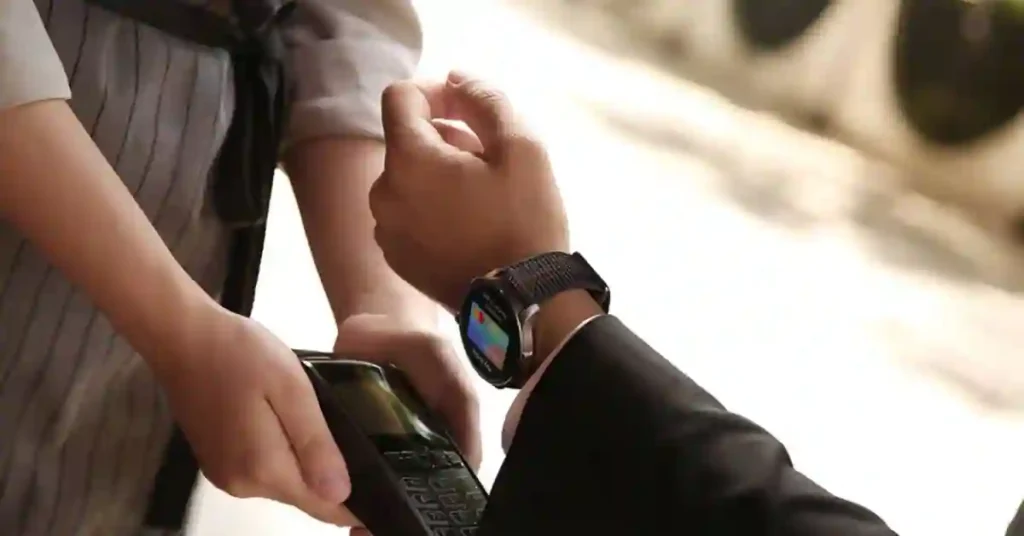
Thanks to a partnership with Mastercard, Zepp Pay allows you to:
- Store up to 8 debit or credit cards securely in the Zepp App.
- Make contactless payments by simply tapping your wrist at any NFC-enabled terminal.
- Enjoy Mastercard-level encryption and security, verified directly within the Zepp App.
Zepp Pay is currently the only supported payment platform for global Amazfit watches — and it’s expanding gradually across Europe.
Regional NFC Availability: The Global Catch
Your ability to use Amazfit’s NFC feature depends not just on the model, but also on the region you purchased it from.
1. Europe, Middle East & Africa (EMEA) – ✅ Payment Enabled
If you buy a new Amazfit (like Balance 2, Active 2 Premium , or T-Rex 3) in Europe, you’re in luck — NFC payments are fully functional.
Supported Payment: Zepp Pay (Mastercard)
Availability: Over 30 countries, including:
UK, France, Germany, Italy, Spain, Austria, Belgium, Czechia, Denmark, Ireland, Netherlands, Poland, Portugal, Sweden, Switzerland, and more.
You can link your Mastercard directly or use Curve to connect other cards.
2. United States & Asia-Pacific (APAC) – ❌ Payment Disabled
Most Amazfit watches sold in the U.S. and Asia either lack NFC hardware entirely or have Zepp Pay disabled in firmware.
Example: The EMEA version of the Amazfit Active 2 Round Premium includes NFC, but the U.S. and Asia-Pacific models do not.
Why?
Amazfit has not yet partnered with Mastercard or local financial regulators to enable Zepp Pay outside Europe.
3. China – Local NFC Systems Only
In Amazfit’s home market, NFC payments work — but only with local Chinese systems.
- Older Models (e.g., Amazfit Verge): Supported Alipay and UnionPay for retail and transport payments.
- Newer Models: May use UnionPay QuickPass.
- Global Zepp Pay (Mastercard): Not available in China.
How to Set Up NFC Payments (Zepp Pay) on Amazfit
Once you’ve confirmed your Amazfit watch supports NFC (and you’re in an eligible region), setup is simple and secure.
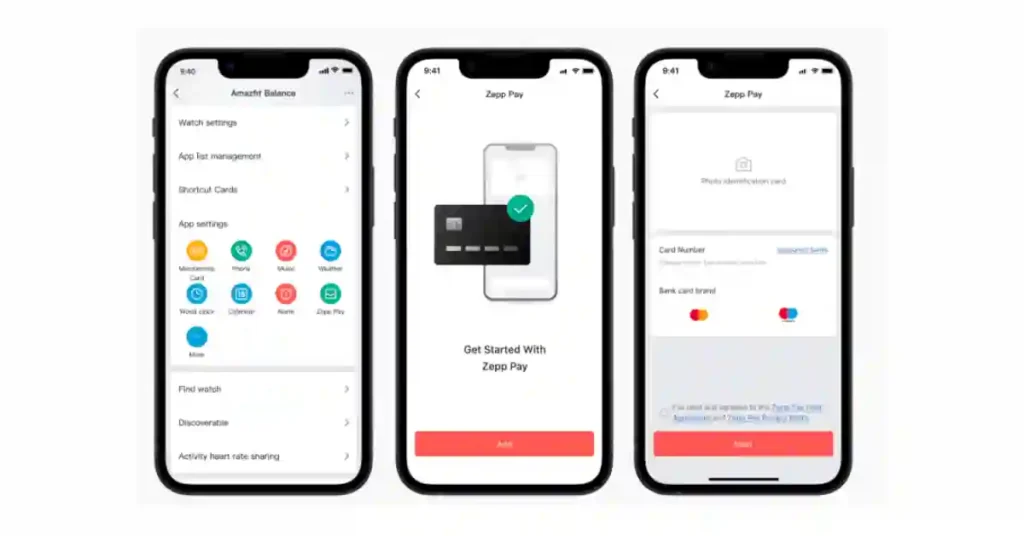
Step 1: Secure Your Watch
First activate your passcode protection Before adding cards
- Open the Zepp App on your smartphone.
- Go to Profile → My Devices → [Your Watch] → Watch Settings.
- Turn on Off-wrist Lock and set a PIN or password.
- This ensures your watch locks automatically when removed.
Step 2: Add Your Mastercard
- In the Zepp App, go to Zepp Pay (under Device Settings or Apps).
- Tap Add Card → enter your Mastercard details.
- Follow the verification steps with your bank.
- You can store up to eight cards for easy switching.
Pro Tip: Use Curve to Add Non-Supported Cards
If your bank isn’t listed, use Curve — a digital wallet that acts as a Mastercard “bridge.”
Add your Visa, AmEx, or other cards to Curve, then add your Curve Mastercard to Zepp Pay.
Step 3: Tap and Pay
- On your watch, open Zepp Pay (via the app list or quick menu).
- Select your card.
- Hold your wrist near any contactless terminal until you feel a vibration or beep.
You’ve just paid — no phone or wallet needed.
❓ FAQs: Which Amazfit Watches Have NFC Payment?
Does Amazfit support Google Pay or Apple Pay?
No — Amazfit uses its own payment platform, Zepp Pay (Mastercard).
Can I use Zepp Pay in the USA or Asia?
Not yet. Currently, Zepp Pay is only active in Europe and select EMEA regions.
Does Zepp Pay work with Visa or AmEx?
No — only Mastercard is supported at the moment, though Curve can help bridge other cards.
Which Amazfit watches have NFC but not Zepp Pay?
Older models like the Amazfit Verge had NFC for Alipay/UnionPay (China only), not Zepp Pay.
Final Thoughts: Check Your Model’s Region Before Buying
If you’re purchasing an Amazfit smartwatch mainly for contactless payments, always verify:
| Region | NFC Feature | Payment Platform |
|---|---|---|
| Europe (EMEA) | ✅ Enabled | Zepp Pay (Mastercard) |
| USA / Asia-Pacific | ❌ Disabled or Missing | Not Available |
| China | ✅ Enabled (Local Use) | Alipay / UnionPay |
Before you buy, check the product listing or ask the retailer about NFC availability — especially if you’re importing your watch.
Bottom Line
- Zepp Pay = Amazfit’s NFC payment system (Mastercard-based).
- Only works in Europe (EMEA) as of 2025.
- Supported models: Amazfit Balance, Balance 2, Active 2, T-Rex 3 series.
- Older models like Verge use Alipay/UnionPay (China only).
So yes — you can pay with your Amazfit watch… just make sure you’ve got the right model in the right region.
Happy tapping 🏃💳⌚
You May Also Like:-
