



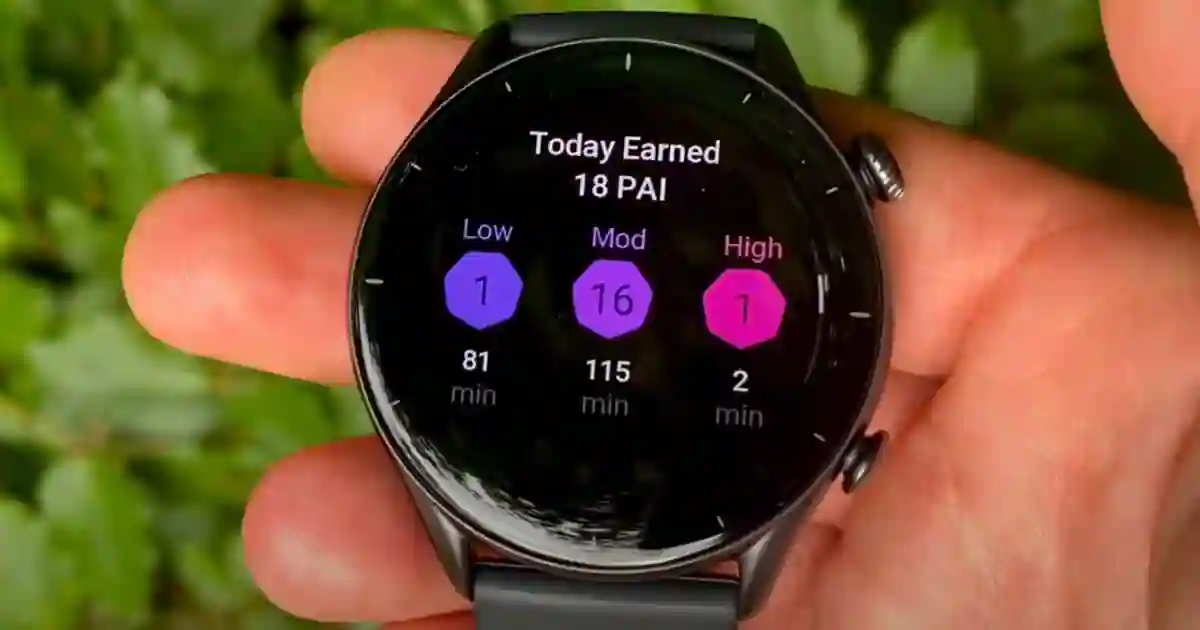
The first time I opened the Zepp app and saw a number called “PAI,” I ignored it for about three weeks.
It sat there on the Health tab — 47, then 62, then 89 — and I had no idea what it meant or whether it mattered. Eventually I looked into it properly. Turns out it’s the most scientifically grounded health metric on the watch. It also happens to be the one most Amazfit users never fully understand.
This guide covers everything: what PAI actually measures, the real research behind it, how to earn points efficiently, and how it compares to Garmin’s Body Battery — which is what most people switching from Garmin want to know about.
What PAI Is — and What It Isn’t
PAI stands for Personal Activity Intelligence. It’s a score, typically between 0 and around 120, that reflects how active your cardiovascular system has been over a rolling seven-day window.
The goal is 100.
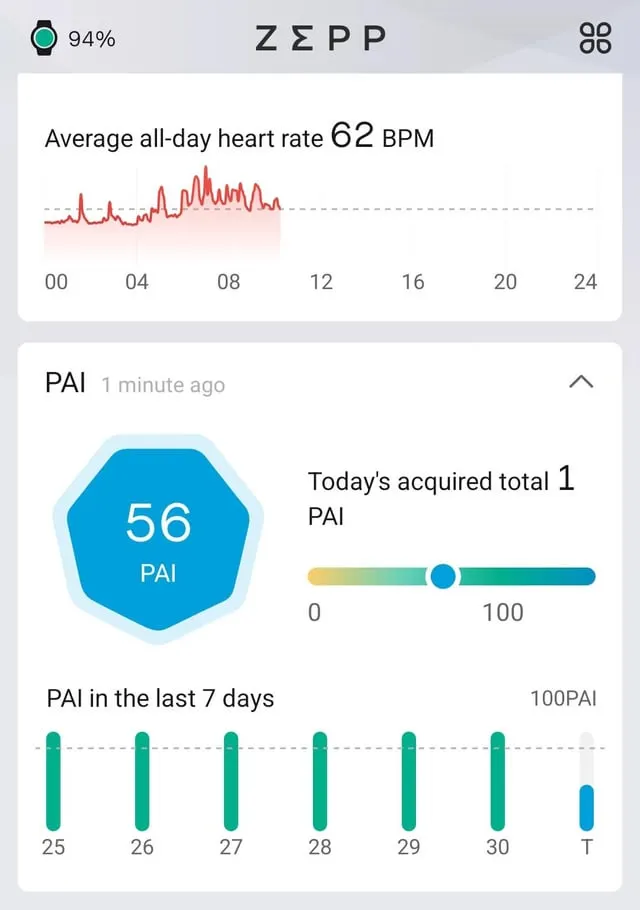
What I got wrong when I first started using it: I assumed PAI was tracking my workouts. It’s not, exactly. A workout is just one way to earn points.
PAI is tracking your heart rate — specifically, how often and how hard your heart was working above your baseline over the past week. Formal workouts are the most efficient way to push that number up, but they’re not the only way.
I found this out when I had a particularly active workday — lots of stair climbing, a rushed walk between meetings, 45 minutes of fairly aggressive housecleaning in the evening. No logged workout. My PAI went up noticeably anyway. That wasn’t an accident.
The Science Behind the Target
The 100 target isn’t arbitrary. It comes directly from the HUNT Fitness Study, one of the largest and longest-running cardiovascular research projects ever conducted — more than 35 years of data involving over 230,000 participants.
The core finding: people who consistently maintained a PAI score above 100 had a 25-36% lower risk of dying from cardiovascular disease, and a 24% lower risk of dying from any cause, compared to inactive people.
That’s a meaningful number. Steps don’t have research like that behind them. The 10,000 steps goal was essentially invented by a Japanese marketing campaign for a pedometer in the 1960s. PAI was built from decades of population health data by Professor Ulrik Wisløff at the Norwegian University of Science and Technology.
Knowing this changed how I thought about it. I stopped treating PAI as a gamification feature and started treating it as a health target with actual evidence behind it.
How PAI Is Calculated
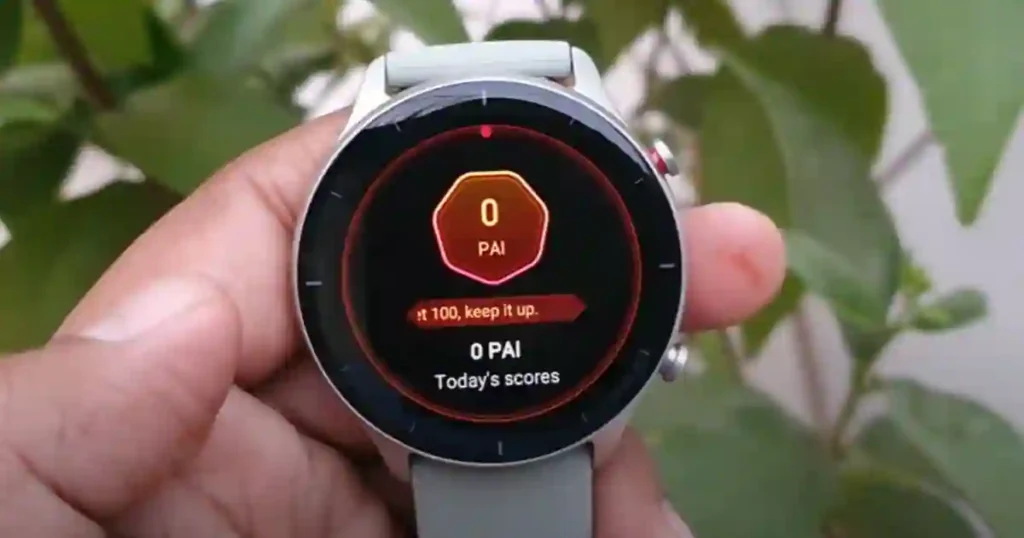
Your watch monitors your heart rate all day. Every time your heart rate rises above your resting level, you start accumulating PAI points. The higher the intensity and the longer it’s sustained, the faster the points pile up.
Here’s something I noticed early on that surprised me.
I tried earning 100 PAI purely through brisk walking one week — no running, no gym, just fast-paced walks. It was possible, but it took a lot of walks. Long ones. The week I hit 100 through walking, I’d done about 5 hours of moderately fast-paced movement spread across seven days.
The week after, I did two 30-minute runs and one 45-minute strength session. Hit 100 PAI by Thursday.
That’s because PAI rewards cardiovascular effort, not just movement. Intensity accelerates point accumulation in a non-linear way. A run earns more per minute than a walk — not just a little more, substantially more, because your heart is working harder.
The algorithm also personalizes the calculation. It factors in your age, sex, resting heart rate, and maximum heart rate. Two people doing the same run won’t earn identical points.
A 55-year-old whose heart rate reaches 145 bpm during a jog is working significantly harder (relative to their baseline) than a 25-year-old fit runner doing the same pace whose heart barely climbs past 130. PAI accounts for that.
PAI Isn’t a Workout Score
This is the most common misunderstanding I see when people first start using Amazfit.
You don’t need to “log” activity to earn PAI. You don’t even need to do something that looks like exercise.
During a week when I had a hiking trip, I barely hit the gym at all — but I finished the week at 118 PAI because I spent two days walking up mountain trails with my heart rate elevated for hours. The watch tracked that through continuous heart rate monitoring, no workout mode required.
That said: starting a formal workout mode does improve accuracy. The watch monitors your heart rate more closely during logged activity than during passive tracking.
For short, intense sessions where precision matters, hitting “Run” or “Strength Training” before you start gives you better data.
The Rolling Seven-Day Window
Here’s something that confused me at first: my PAI dropped overnight even on days I’d exercised.
What’s happening is that PAI operates on a strict seven-day rolling window. Points earned eight days ago expire and fall off your score, regardless of what you did yesterday.
So if you have a great active week, hit 115 PAI, and then get sick and rest for a few days — your score will drop. Old points are aging out while no new ones are coming in.
This is intentional. PAI is supposed to reflect your current week’s activity level, not your lifetime achievement. It keeps the metric honest and forward-looking.
Once you understand the rolling window, the score becomes much easier to manage: the goal isn’t to hit 100 once and celebrate. It’s to consistently replace expiring points with fresh ones.
Approximate PAI From Different Activities
One of the things I wish someone had shown me early on. These are approximate — your exact numbers depend on your personal heart rate profile.
| Activity | Duration | Approximate PAI |
|---|---|---|
| Brisk walk | 30 min | 8–15 |
| Easy jog | 30 min | 15–25 |
| Running (moderate pace) | 30 min | 20–35 |
| HIIT / interval training | 30 min | 25–40 |
| Cycling (moderate effort) | 30 min | 15–30 |
| Swimming (continuous laps) | 30 min | 20–30 |
| Strength training (circuits) | 45 min | 15–25 |
| Slow walk | 60 min | 5–10 |
| Heavy housecleaning | 45 min | 8–15 |
The takeaway: two 30-minute runs and one solid gym session can get most people to 100. A daily 30-minute walk alone typically won’t — you’d need to make those walks genuinely brisk.
How Long Does It Take to Reach 100 PAI?
From zero, with regular exercise, most people hit 100 within four to seven days of consistent activity.
I tested this deliberately after resetting my Zepp account. Starting from 0, I hit 100 on day five after two moderate runs, one cycling session, and staying reasonably active in between.
The harder question is maintaining 100 week after week. That requires roughly the activity levels above, repeated consistently. If you exercise three times per week at moderate-to-vigorous intensity, you’ll likely hover in the 90-115 range once you’ve established a baseline.
Can You Lose PAI?
Yes. And faster than you’d expect.
Take four or five rest days and watch your score. If your most active points are eight or more days old, they’ll fall off and your score will decline without you doing anything differently.
I lost about 30 points during a week I was traveling with minimal exercise — not because I did anything wrong, just because old points expired faster than I earned new ones.
This is one of the best things about PAI as a metric. It keeps you honest. It doesn’t let a good week carry you forever.
How to Improve Your PAI Score — What Actually Works
Increase intensity, not just time
The single most effective change I made was adding one faster-paced session per week. I replaced one of my casual evening walks with a 25-minute run. My weekly PAI went up by about 30 points without adding more time to my routine.
Add short intense bursts to existing walks
If you mostly walk for exercise, try adding 2-3 minutes of faster walking or light jogging every 10 minutes. Your heart rate will climb higher and stay there, earning PAI at an accelerated rate. I did this for a month without changing anything else and stayed consistently above 85 PAI.
Enable All-Day Heart Rate in the Zepp app
Go to Zepp app → Profile → your watch name → Health Monitor → enable All-Day Heart Rate. Also enable Activity Detection. This is the most important setup step. Without continuous heart rate monitoring, your watch samples every few minutes and can miss short spikes in heart rate. You might earn less PAI than you actually deserve.
Check that your personal data is correct
Your PAI calculation uses your age, sex, and resting heart rate. If you entered rough estimates when you first set up the watch and never updated them, your PAI might be miscalibrated. Go to the Zepp app → Profile → Personal Info and verify everything.
Wear the watch during sleep
Sleep doesn’t earn PAI points directly — your heart rate needs to be elevated above resting. But wearing the watch overnight gives Zepp a more accurate picture of your resting heart rate, which makes your daytime PAI calculations more precise.
Common Mistakes That Hurt Your PAI Score
Loose watch band — If the sensor lifts off your skin, it misses heart rate elevations entirely. Your PAI will be lower than it should be. The watch should sit snug, one to two finger-widths above the wrist bone.
Heart rate monitoring set to intervals — Budget Amazfit models sometimes default to monitoring every 5-10 minutes instead of continuously. Check your settings and set it to All-Day if available.
Activity too easy — A slow walk barely earns PAI. If you’ve been doing the same gentle walk every day and your score is stuck around 40-60, the activity simply isn’t hard enough to generate meaningful points.
Not wearing it consistently — PAI only counts hours the watch is on your wrist. If you take it off for most of the day, points from legitimate activity get missed.
Which Amazfit Watch Tracks PAI Best?
Every current Amazfit watch has PAI. The difference between models comes down to heart rate sensor quality and whether monitoring is continuous or interval-based — and this genuinely affects accuracy.
During my testing, the gap between sensor generations showed up most during interval training and heavy lifting. At moderate steady-state effort, cheaper sensors track well enough. When heart rate spikes quickly and briefly, the cheaper sensors miss some of it.
Amazfit Balance 3 and Balance Ultra
These use the BioTracker 6.0 sensor with true continuous monitoring. Best available PAI accuracy. If your goal is tracking PAI during intense sessions, this is the watch for it.
The Balance 3 also supports the Helio Strap Pro for upper-arm monitoring, which is more accurate during functional fitness movements where wrist sensors struggle.
Check Balance 3 Price on Amazon
Amazfit Active Max and Active 3 Premium
BioTracker 5.0 with continuous monitoring. During everyday cardio, I got nearly identical PAI scores from these as from the Balance models.
The gap only appeared during aggressive interval sessions. For most people, these are accurate enough — and at $169, they’re the sweet spot.
Check Active Max Price on Amazon
Check Active 3 Premium Price on Amazon
Amazfit Active 2
Solid for moderate activity. Heart rate lag during rapid-intensity changes means PAI during HIIT or heavy lifting may be slightly understated. For walkers, cyclists, and moderate runners, it’s fine.
Check Active 2 Price on Amazon
Amazfit Bip Max and Bip 6
Interval-based monitoring rather than truly continuous. For casual exercisers doing steady cardio, the difference is small. For anyone doing frequent short bursts of intense activity, you may be underearning PAI due to missed spikes.
Honest summary: if your workouts are moderate intensity and last 30+ minutes, you don’t need the flagship sensor to track PAI accurately.
The Active Max gave me near-identical scores to the Balance models across a month of typical training. The sensor upgrade matters mainly if you’re doing a lot of brief, intense efforts.
PAI vs Garmin Body Battery
This is the comparison most people who’ve used Garmin want to understand before switching to Amazfit. And the honest answer is: they’re not really competing. They measure different things.
PAI — measures whether you’ve been active enough this week. It’s a weekly fitness accumulation metric. High PAI means you’ve consistently stressed your cardiovascular system at a level that research associates with better long-term health.
Garmin Body Battery — measures how much energy you have available right now. It’s a real-time readiness score. High Body Battery means you’ve recovered well and are ready to train hard.
One tells you if you’ve done enough. The other tells you if you’re ready to do more.
After wearing both for an extended period, I found myself checking Body Battery first thing in the morning — it told me whether to push or take it easy that day. I checked PAI at the end of the week — it told me whether I’d accumulated enough activity to stay in the healthy range.
Amazfit has BioCharge, which functions more like Body Battery — a daily readiness score based on HRV, sleep, and stress. PAI and BioCharge together give you roughly the same picture as PAI and Body Battery together.
The honest difference: Garmin’s readiness stack — Body Battery, HRV Status, Training Readiness — is more mature and more deeply integrated with training load management.
If you’re training for a marathon and making daily decisions based on recovery data, Garmin’s system has more depth. For general fitness tracking and health maintenance, PAI plus BioCharge covers what most people actually need.
| Amazfit PAI | Garmin Body Battery | |
|---|---|---|
| What it measures | Weekly cardiovascular activity | Current energy / readiness |
| Score range | 0 to ~120+ | 0 to 100 |
| Time horizon | Rolling 7 days | Real-time |
| Primary question | “Have I been active enough?” | “Am I ready to train today?” |
| Science backing | HUNT Study, 35+ years, 230,000 participants | Garmin’s proprietary algorithm |
| Subscription | None | None |
| Closest Amazfit equivalent | Unique to Amazfit | BioCharge |
Setting Up PAI Properly
Step 1: Open Zepp app → Profile → your watch name → Health Monitor → enable All-Day Heart Rate and Activity Detection. This is the most important step and the most commonly skipped.
Step 2: Verify your personal info is accurate — age, sex, resting heart rate. Go to Zepp app → Profile → Personal Info.
Step 3: Set up a PAI watch face widget or keep the PAI app accessible in your app list so you can check it without opening your phone.
Step 4: Check the app breakdown weekly, not daily. The day-to-day number is less meaningful than the weekly trend.
Frequently Asked Questions
What is PAI on an Amazfit watch?
PAI stands for Personal Activity Intelligence. It’s a health score between 0 and 100+ that tracks how hard your cardiovascular system has been working over the past seven days. The target is to maintain 100 or higher consistently, which research from the HUNT Study — spanning 35 years and 230,000+ participants — links to a 25-36% lower risk of cardiovascular disease.
How do I improve my PAI score on Amazfit?
Add more vigorous activity — anything that gets your heart rate meaningfully above resting. Running, cycling, swimming, HIIT, and brisk walking all work. Short intense sessions earn more per minute than long slow ones. Make sure All-Day Heart Rate is enabled in the Zepp app for accurate tracking.
What is a good PAI score?
100 or above is the evidence-based target. Maintaining 100 consistently week after week is associated with the cardiovascular health benefits documented in the HUNT Study. Going above 100 is fine but doesn’t provide significantly greater benefit.
How long does it take to reach 100 PAI?
Starting from zero with regular exercise, most people hit 100 within four to seven days. Two to three moderate-to-vigorous sessions per week — 25-45 minutes each — is typically enough to maintain 100 consistently.
Can you lose PAI points?
Yes. PAI operates on a rolling seven-day window. Points earned more than seven days ago expire off your score. If you take several rest days, your score will decline as older points age out even without doing anything wrong.
Is PAI better than step counting?
For cardiovascular health specifically, yes. Steps treat all movement equally regardless of effort. PAI only accumulates points when your heart rate is elevated enough to provide cardiovascular benefit. It’s more directly tied to the health outcomes that research has measured.
Which Amazfit watch has the best PAI tracking?
The Balance 3 and Balance Ultra use BioTracker 6.0 with true continuous monitoring — most accurate, especially during intense exercise. For most users, the Active Max or Active 3 Premium at $169 track PAI accurately enough. Budget models (Bip Max, Bip 6) use interval monitoring, which can miss short intensity spikes.
Is PAI the same as Garmin Body Battery?
No. PAI measures weekly cardiovascular activity accumulation — “have I been active enough this week?” Body Battery measures current energy and readiness — “am I recovered enough to train hard today?” They answer different questions. Amazfit’s equivalent to Body Battery is BioCharge.
Related Guides on SmartWatchSphere
- Best Amazfit Smartwatches in 2026 — Every Model Ranked
- Amazfit BioCharge Explained: What It Is and How to Improve Your Score
- Amazfit Active 2 Review — 16 Months Honest Take
- Does Amazfit Work With iPhone? Complete 2026 Guide
- Amazfit Notifications Not Working? Complete Fix Guide
- Best Amazfit Under $100
PAI research: HUNT Fitness Study, led by Professor Ulrik Wisløff, Norwegian University of Science and Technology — 35+ years, 230,000+ participants. The5kRunner long-term Amazfit assessment (2026). Personal testing conducted on Amazfit Active 2, Active Max, and Balance 2 across multiple training weeks. All prices as of July 2026.
